MAVERICK, You Rock!! Thank you for guarding the juice spill for me in the cafeteria. You were so helpful. - Mrs. Heather
Ryder Richardson, THANK YOU, for being so HONEST and RESPECTFUL by returning my football to me for The Project. I really appreciate it!
-Mrs. Heather
Thank you, Mrs. Galayda, for cleaning up the tree by the sign and new flowers. It looks great! - Mrs. Heather
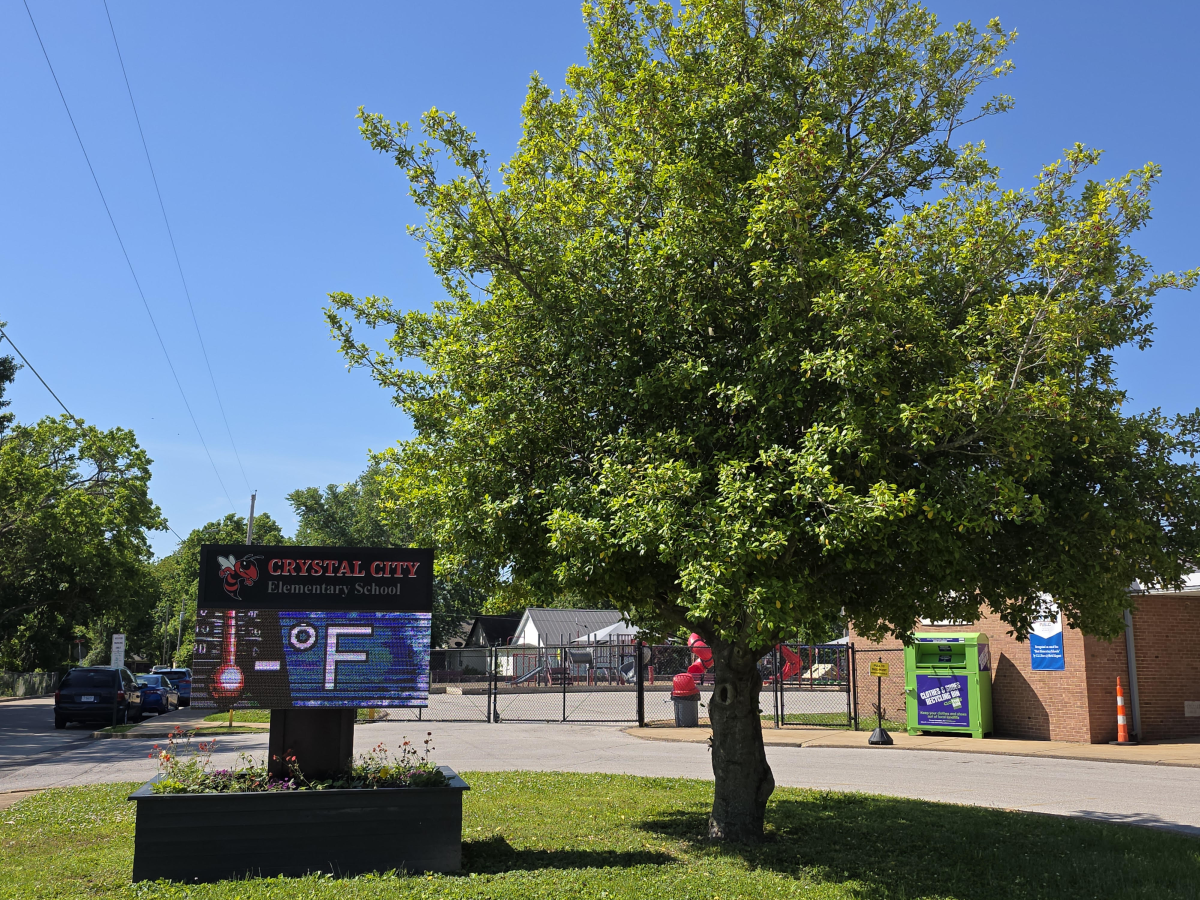
Thank you, Colt Wallman, for helping me carry flowers to the school sign before school. - Mrs. Heather
Thank you to Patrick Gee for cleaning up a mess in the cafeteria.
SHOUT OUT to Mrs. Grothoff for helping Mrs. Heather find the perfect books for each of the Art classes. Thank you!

A huge thank you to Mrs. Rothweiler for helping with our Martina play! She's even playing a part! You ROCK! Another shout out to Mrs. Breeze and the GATE students for helping make our masks! You all are amazing! THANK YOU!
Thank you to Liam Gordon for helping a friend write while he's in a cast. That was very kind of you!
Thank you for picking up trash that wasn't even yours! Great Job Roman Goodwin!

Thank you to Patrick Abney and Quincy Holmes for cleaning up a mess in the cafeteria that wasn't even yours to clean up! You ROCK!

Shoutout to Mrs. Picarella’s class for helping to fill the Christmas food boxes for our Helping Hands Families.

Shout out to Lily Hilderbrand for helping out each week in the kindergarten class!! You are doing an amazing job!!

Mrs. Crump 🙂
Thank you Kole and Kai for offering to clean up someone else's mess in the lunchroom! You both cleaned it up, before we even realized that you didn't cause the mess! You both Rock!!!

Thank you Mrs. Barley for stepping up while I was gone and helping out with ALL of 2nd grade. I appreciate you so much!! Love, Harmon
Shout out to Faith Siedler for always being kind to everyone! You are a rock star and show true Hornet Pride!
Shout out to Owen Seifert for helping to keep our school safe! Alwyas remember, if you see something that doesn't look right, LET AN ADULT KNOW!
Thank you Miss Mary for raising money for Catherine Cares!
A HUGE thank you to Darren Goode, Ryder Richardson, John Vinyard, Jason Kirsch, Mrs. Kirsch, Olivia Grothoff, and Lucas Grothoff. They helped carry in all the food and water that will be used for the Father / Daughter dance. It helped me more than they realize. You kiddos rock!!
-Mrs. Grothoff
A HUGE thank you to Mr. Will & Mr. P! They helped one of my students who got her arm stuck in the railing near the cafeteria. You both ROCK! Thank you!
Thank you 6th grade for being so amazing to all students. It makes our hearts so happy that you help show our kiddos how to play the things you are all doing outside at recess. They come in and can't stop talking about it!!!
You ALL ROCK!!!
Love,
Mrs. Picarella and Mrs. Rothweiler
WELCOME BACK CCES Students!!! We hope that each and every one of you has an Amazing School Year in 2025-26!

Thank you, Braiden Oller, for doing such an awesome job cleaning up your spill! You showed KINDNESS to Mr. Will by do it so he wouldn't have to! Proud of you buddy!
Shout out to Serenity and Kaylee, I came down to the cafeteria to see them both wiping tables and helping out!
Great job to Aubrey Riney for looking out for those around her and being aware of her surroundings.
Shout out to Kole Lewis for doing the right thing and turning in money that he found on the playground!
Thank you toTarek Fisher for doing the right thing by turning in money he found at Family Fun Night!
A huge thank you to Mrs. Harmon for always sharing her fun ideas with me! Love, Klamert
Shout out to Reyna Correa for showing kindness and helping another student each morning!
Shout out to Ryder Richardson! Thank you for always keeping the classroom clean and organized.
Thank you to Mrs. Duncan for helping out with peer observations!! You're the best!
Shout out to Remington for helping clean up the bathroom! 🙂
Reese Meyer was a kindness rock star by helping a student clean up water they spilled in the gym. Way to go Reese!
Elaina Johnson showed her kindness by helping a student pick up their breakfast when they dropped it. Way to be helpful and kind Elaina!
Shout out to Jaiden Russell for helping to prepare the classroom each morning! You are amazing!
Thank you to Riley Davis, Emma Drennen, and Makenzie Ahart for creating a welcoming environment for our new student.
Thank you to Charlotte Woods for ALWAYS going above and beyond to make sure the cafeteria is picked up after lunch. You are a great inspiration to others!!
Thank you to Kennedy Oliver for always being so gracious and kind to others! You are a true inspiration to your classmates!
Crystal City Hornets ROCK!!!
A HUGE 'Thank You' to Ms. Waites and staff for bringing the YOU UPLIFT Kindness Wall to Crystal City Schools!
Go CCSD!

If you would like to renew your YouUplift Kindness eWall subscription, then please click on one of the following:

If you feel you are receiving this message in error, then please contact us at:
doug@YouUplift.com
276-733-9204
Yes! There are no Sign-Ups and no Log-Ins required in order to participate, as we collect no data or information of any kind. The platform is currently being used by large and small school systems throughout the country in almost all 50 states, and it has passed 100% of all school privacy regulations to date.
Yes! You can have all messages sent to as many faculty email inboxes as you’d like for Approval, and we can change or add to this list at any time.
Yes! Many of our schools do this, because if your students take to it – then the messages can begin to overflow your school email inbox at times. Not only will a separate gmail account prevent this from happening, but you can also make it accessible to all faculty members if you choose to.
You can choose one of three ways to display your messages onto a facility TV monitor.
  1. HDMI CORD – Some schools will access their Kindness eWall on a laptop and run an HDMI cord to their TV monitor.
  2. CAST – Some schools will access their Kindness eWall via a tablet or device and will cast it to their TV monitor via a Chromecast or Apple TV device.
  3. SMART TV WITH INTERNET BROWSER – If your Smart TV has an Internet Browser (Samsungs), then you can place your Kindness eWall link in the browser and it will run from there.
Yes! You can edit the text of any message before Approving it. In addition, if you’d like to keep a message but would like to remove an included image… or if you’d like to keep an image and remove the text, then you can do this before Approving the message. Your Rotating Display will only display exactly what you choose to make visible.
You will have a back office ADMIN PANEL that will allow you to delete, edit, and approve messages (individually or in bulk).
You will have a back office ADMIN PANEL that will allow you to customize your colors, logo, title, and font size.
Upon your request, we can replace your current Anonymous Submission Form with a Form from your school’s email system (ex. Google Form). This makes messages come to you with the author’s email address included, and you simply COPY/PASTE the message onto your INSTANT POST Page in order to make it live.

(Note: Because messages are submitted through your school’s email system, the Character eWall collects no data or information – making it fall within all school privacy regulations.)
We can provide your Tech Team with a simple line of code that will allow them to embed your Rotating Display of Approved Messages onto your school website, so that they are visibly scrolling whenever anyone comes to your site.
The system is set to display the 100 most recently Approved messages, as older messages start falling out of the rotation in order to make room for the newer messages. However, we can increase or decrease this number to be whatever you’d like it to be.
Your subscription includes an unlimited number of messages and an unlimited number of displays for everyone in your school for the entire length of your subscription.
Yes and No. Your Character Wall is a web app, but it is not located in an App store. However, this link shows you how you can easily turn your Kindness Wall into an app for any android or apple device: Phone Web App Instructions
Phone App Install Feature
Currently, YouUplift does not have an app located in the App Store. However, the following link provides simple instructions on how to easily turn your Kindness eWall into a homepage app for any mobile device: Phone App Install Instructions
(Great tech assignment for students!)
Website Embed Feature
This feature provides your Tech Team with a simple line of code that would allow you to embed your Rotating Display of Positive Messages into your school website, so that visitors can instantly see your messages.
Social Media Share Feature
This feature places Social Media Share Buttons on your entire Kindness e-Wall webpage or just on your Rotating Display only – whichever you prefer.

Yes! There are no Sign-Ups and no Log-Ins required in order to participate, as we collect no data or information of any kind. The platform is currently being used by large and small school systems throughout the country in almost all 50 states, and it has passed 100% of all school privacy regulations to date.

Yes! You can have all messages sent to as many faculty email inboxes as you’d like for Approval, and we can change or add to this list at any time.

Yes! Many of our schools do this, because if your students take to it – then the messages can begin to overflow your school email inbox at times. Not only will a separate gmail account prevent this from happening, but you can also make it accessible to all faculty members if you choose to.

You can choose one of three ways to display your messages onto a facility TV monitor.
  1. HDMI CORD – Some schools will access their Kindness eWall on a laptop and run an HDMI cord to their TV monitor.
  2. CAST – Some schools will access their Kindness eWall via a tablet or device and will cast it to their TV monitor via a Chromecast or Apple TV device.
  3. SMART TV WITH INTERNET BROWSER – If your Smart TV has an Internet Browser, then you can place your Kindness eWall link in the browser and it will run from there.

Yes! You can edit the text of any message before Approving it. In addition, if you’d like to keep a message but would like to remove an included image… or if you’d like to keep an image and remove the text, then you can do this before Approving the message. Your Rotating Display will only display exactly what you choose to make visible.

You will have a back office ADMIN PANEL that will allow you to delete, edit, and approve messages (individually or in bulk).

You will have a back office ADMIN PANEL that will allow you to customize your colors, logo, title, and font size.

In it’s default setting, your school’s Kindness eWall uses an Anonymous Submission Form in order to comply with all school privacy regulations. Therefore, though you will be able to APPROVE all submitted content before it becomes visible, you will not know who the author of the message is.


HOWEVER, upon your request, we can include a SUBMISSION FORM LOGIN which would require users to enter their email / password in order to submit a message. This would allow you to APPROVE all submitted content before it becomes visible and will also provide you with the email address of each message’s author (whether you Approve it or not).

We can provide your Tech Team with a simple line of code that will allow them to embed your Rotating Display of Approved Messages onto your school website, so that they are visibly scrolling whenever anyone comes to your site.

The system is set to display the 100 most recently Approved messages, as older messages start falling out of the rotation in order to make room for the newer messages. However, we can increase or decrease this number to be whatever you’d like it to be.

Your subscription includes an unlimited number of messages and an unlimited number of displays for everyone in your school for the entire length of your subscription.

Yes and No. Your Kindness Wall is a web app, but it is not located in an App store. However, this link shows you how you can easily turn your Kindness Wall into an app for any android or apple device: Phone Web App Instructions