grasias ms cindia por a yutarmecuan do no prestra adension y deagadesco mucho por ayudra me cuam do me prodromal a r c a n g e y deboy adar Uno's dulse espero que de jusden me es for sare y espero que debaya Bien con tu carera de maestra nucade Rita' de deseolo mejo nucade Rita' ysi je asi sienper de TU NES TU dian de a l no bueno ponder El nomper pipipi
Gracias Mr Roco por ayudarme en mathematics cuando nesesitaba ayuda en El trabajo y ayudarme a corejir mis errors y Gracias por ensenarme nuevas estratejias para ayudarme
Dear Ms.Martinez thank you for all the things you taught me.

ps.surian
Thank you Ms. Brown for helping me learn a lot of things ! _Jonnie
Dear Ms Gomez, thank you for teaching me literacy and math. Also thank you for giving us fun times and for making the class interesting. - sincerely, Abby 🙂
Dear Ms. Brown thank you for being kind, respectful and helping me learn a lot. _ Ethan
Dear Ms. Roybal thank you for teaching us to go to 3rd grade we will miss you have a great year with your new 2nd graders. From: Symphani
Thank you Ms. Celeste for being a great teacher
To Ms. Martinez: Thank you for being the best teacher -juliana
Ms liz, thank you for being my teacher.

Ps. estefany
To Ms. Martinez: Thank you for helping me and teaching me a lot/more. -Ashly
To Ms. Martinez: Thank you for teaching me a lot -Romina
To Ms. P: Thank you for teaching us math and geometry and taking care of us. -Niky
Ms.p thank you for teaching us.

ps.julius,Frank,adriel
To Ms. P: Thank you for teaching us math and science. -Hailey
Ms domigez,thank you for helping me alot and I miss you alot


ps luz
To Ms. Jensen: Thank you for being the best teacher ever. For being kind. -yael
Ms Taya,thank you for helping me when i'm stuck.

niko
To Ms. p: Thank you for helping out a lot. -Moneer
Ms Andrea, thank you for making me happy.

ps. julian
Ms suchi,thank for helping out in the school
Dear Ms. Gomez, thank you for helping me in math 🙂 You teach very fun things. You are always nice to me and I love that. You are the best teachers in the world 🙂 Thanks for teaching me new things. - Ana 2nd grade.
Thank you all teachers for teaching us and thank you for every single thing you do for us. _ Mateo
Thank you 5th grade teachers / Mr Rocco ,Mr Hermosa, Miss Pilon Miss mobares for teaching us and helping us. Sincerely, Maria Sofia
I love to be in your class and I like to be working with you. I also like when you are respectful to me. From: Leo To: Ms. Gomez
You are a kind teacher Ms. newton! _ Izzy
Mrs.Tajeda Thank you for being kind to me. (Naretzi)
I like how you gave me a card because I gave you a pouch to Ms.Siddens
from Waseya
Ms. Siddens Thank you for helping us learn and always being kind. (Jaylianna)
Thank you very much for teaching me Ms.Siddens from Harper
Ms. Siddens thank you for helping us learn. (Isla)
Mr Rocco and Mr Hermosa for helping me grow this year, I am a better student, and ready for 6th. You are the best teachers ! - Ana 5th 🙂
Thank you Mariah for being nice to me
Thank you Ms.Mobarez for teaching me math and about the biology and all this stuff this year. Thank you Ms. Pilon for teaching me about literecy and about science too, it was really fun and cool experiments. and also Ms. Sarah thank you for being with and also playing basketball with me. W friends Enzo, Chris, Axel, messi/messiah, mo, Gabriel, Hameed, jose, thomas, David, Jayden, Dominic,Giuliano

Thank you Ms.Siddens for letting me have lunch bunch in your room every Friday!! From: Lili.D
I want to give a shoutout for Ms. Mobarez because I like the very welcoming class
Thank you to my friends in gust and to all my teachers for helping me learn and grow smarter
thank you Ms. Egan for taking the time out of your week to teach us skills for the future like breathing skills and copping skills.
THANK U SO MUCH to my awesome teacher Mrs. Mobarez! You helped me grow so much and you were always so sweet. You have been the BEST teacher I have ever had. I have never understood math and science better than when you taught me. I hope you have a great life!!! Byeeeeeee😃
Thank you Ms.Pilon for getting me through the year!
Thank you Ms.Pilon for being nice to me
Thank you Mr.Rocco for teaching us about puberty and the other stuff and I hope you have a great rest of your year.
Thank you Cameron for carrying the class and being funny.
Thank you Ms. Pilon for helping me write a proper essay. Also helping me get better at things I needed to work on. - LillyG
Thank you Mrs. Mobarez for helping me learn math. (Cameron)
Thank you Ms.Egan for giving me lunch bunch with my freinds.
Thank you Mrs.Mobarez and Ms.Pilon! You guys help me grow so much this year.
Thank you Mrs. Egan for helping me feel good about myself
Thank you for everything you did for us. Thank you for teaching us everything we need to know for first grade. To: Ms. Belknap
Ms. Belknap, I love how you do your hair, and how you teach. Thank you for being a good teacher. -Jaylin
Thank you for RJ (5th grade) for helping first graders with math twice a week! - Ms. Siddens
Thank you Lily D for spending lunch in my first grade room on Fridays! - Ms. Siddens
Rosie- thank you for teaching me to play Taco Cat Goat Cheese Pizza afterschool!- Ms. Siddens
YAY Shakespeare Festival! Ms. Mariel and Ms. Jackie helped so much with the Shakespeare Festival. The 16 actors did an amazing job!
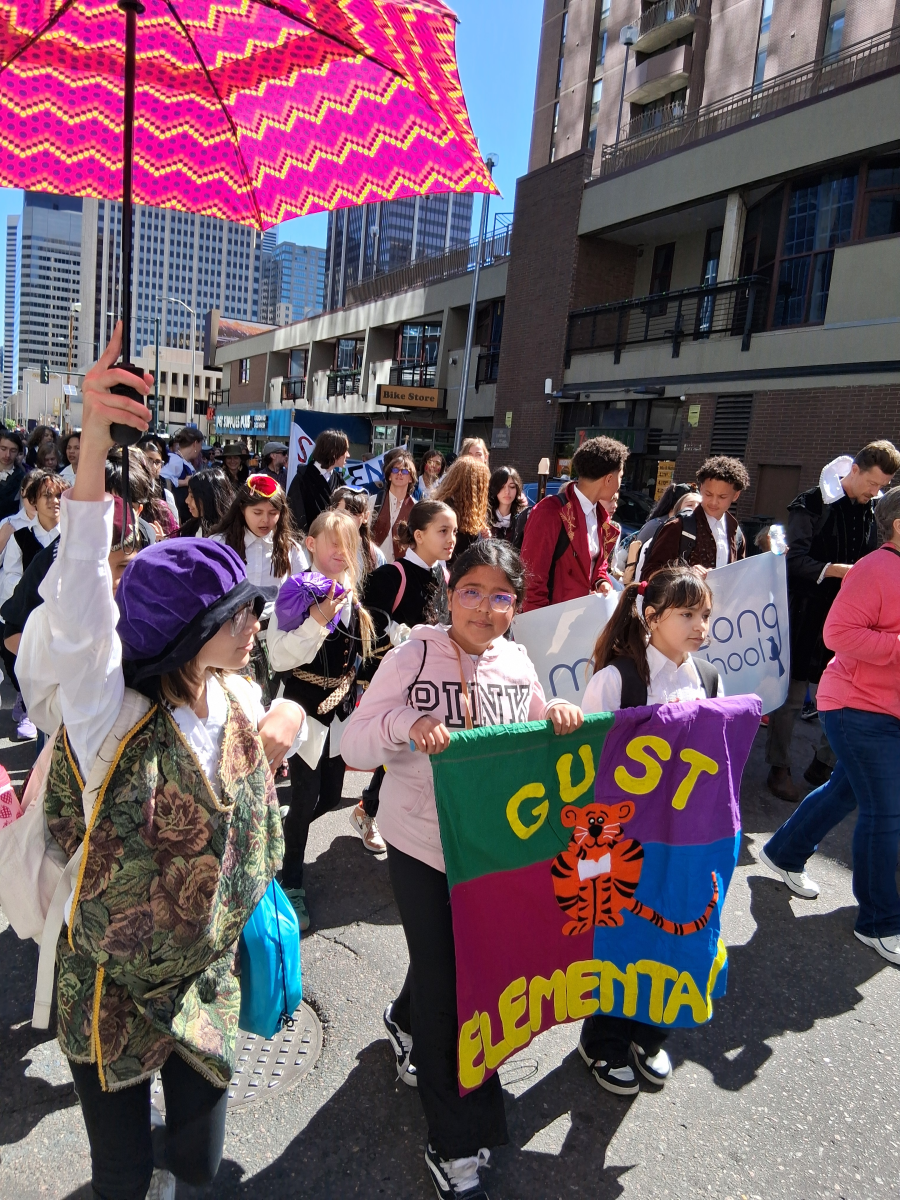
Thank you Miss Mobarez for always believing in me when I could not do hard things and for always teaching math.

Axel he is always nice to me he is never mean to me and he is a good freind
Thank you Andrea for helping me learn new and more things. I couldn't have done it without you. Also thank you for being there for my ups and downs and paying attention to the little things about me, you were then for me and always made me laugh even when I didn't feel like it. You helped me get through the school year and I hope we can continue on as friends. - Lilly G
yo wsp thank you Ms.Ellis for the rockies
Thank you Enzo for helping me be happy and even when im sad you help me smile and your one of the greatest friends ive ever had 🙂
Thank you Jayden for always making me laugh and make School a little better. (Cameron)
Thank you enzo for making me smile and brighting my day
Thank you staff for helping the school stay on track.
Thank you to Ms. Ellis for taking us to the Rockies game!- Elicia, Ana, Nazifa 🙂

If you would like to renew your YouUplift Kindness eWall subscription, then please click on one of the following:

If you feel you are receiving this message in error, then please contact us at:
doug@YouUplift.com
276-733-9204
Yes! There are no Sign-Ups and no Log-Ins required in order to participate, as we collect no data or information of any kind. The platform is currently being used by large and small school systems throughout the country in almost all 50 states, and it has passed 100% of all school privacy regulations to date.
Yes! You can have all messages sent to as many faculty email inboxes as you’d like for Approval, and we can change or add to this list at any time.
Yes! Many of our schools do this, because if your students take to it – then the messages can begin to overflow your school email inbox at times. Not only will a separate gmail account prevent this from happening, but you can also make it accessible to all faculty members if you choose to.
You can choose one of three ways to display your messages onto a facility TV monitor.
  1. HDMI CORD – Some schools will access their Kindness eWall on a laptop and run an HDMI cord to their TV monitor.
  2. CAST – Some schools will access their Kindness eWall via a tablet or device and will cast it to their TV monitor via a Chromecast or Apple TV device.
  3. SMART TV WITH INTERNET BROWSER – If your Smart TV has an Internet Browser (Samsungs), then you can place your Kindness eWall link in the browser and it will run from there.
Yes! You can edit the text of any message before Approving it. In addition, if you’d like to keep a message but would like to remove an included image… or if you’d like to keep an image and remove the text, then you can do this before Approving the message. Your Rotating Display will only display exactly what you choose to make visible.
You will have a back office ADMIN PANEL that will allow you to delete, edit, and approve messages (individually or in bulk).
You will have a back office ADMIN PANEL that will allow you to customize your colors, logo, title, and font size.
Upon your request, we can replace your current Anonymous Submission Form with a Form from your school’s email system (ex. Google Form). This makes messages come to you with the author’s email address included, and you simply COPY/PASTE the message onto your INSTANT POST Page in order to make it live.

(Note: Because messages are submitted through your school’s email system, the Character eWall collects no data or information – making it fall within all school privacy regulations.)
We can provide your Tech Team with a simple line of code that will allow them to embed your Rotating Display of Approved Messages onto your school website, so that they are visibly scrolling whenever anyone comes to your site.
The system is set to display the 100 most recently Approved messages, as older messages start falling out of the rotation in order to make room for the newer messages. However, we can increase or decrease this number to be whatever you’d like it to be.
Your subscription includes an unlimited number of messages and an unlimited number of displays for everyone in your school for the entire length of your subscription.
Yes and No. Your Character Wall is a web app, but it is not located in an App store. However, this link shows you how you can easily turn your Kindness Wall into an app for any android or apple device: Phone Web App Instructions
Phone App Install Feature
Currently, YouUplift does not have an app located in the App Store. However, the following link provides simple instructions on how to easily turn your Kindness eWall into a homepage app for any mobile device: Phone App Install Instructions
(Great tech assignment for students!)
Website Embed Feature
This feature provides your Tech Team with a simple line of code that would allow you to embed your Rotating Display of Positive Messages into your school website, so that visitors can instantly see your messages.
Social Media Share Feature
This feature places Social Media Share Buttons on your entire Kindness e-Wall webpage or just on your Rotating Display only – whichever you prefer.

Yes! There are no Sign-Ups and no Log-Ins required in order to participate, as we collect no data or information of any kind. The platform is currently being used by large and small school systems throughout the country in almost all 50 states, and it has passed 100% of all school privacy regulations to date.

Yes! You can have all messages sent to as many faculty email inboxes as you’d like for Approval, and we can change or add to this list at any time.

Yes! Many of our schools do this, because if your students take to it – then the messages can begin to overflow your school email inbox at times. Not only will a separate gmail account prevent this from happening, but you can also make it accessible to all faculty members if you choose to.

You can choose one of three ways to display your messages onto a facility TV monitor.
  1. HDMI CORD – Some schools will access their Kindness eWall on a laptop and run an HDMI cord to their TV monitor.
  2. CAST – Some schools will access their Kindness eWall via a tablet or device and will cast it to their TV monitor via a Chromecast or Apple TV device.
  3. SMART TV WITH INTERNET BROWSER – If your Smart TV has an Internet Browser, then you can place your Kindness eWall link in the browser and it will run from there.

Yes! You can edit the text of any message before Approving it. In addition, if you’d like to keep a message but would like to remove an included image… or if you’d like to keep an image and remove the text, then you can do this before Approving the message. Your Rotating Display will only display exactly what you choose to make visible.

You will have a back office ADMIN PANEL that will allow you to delete, edit, and approve messages (individually or in bulk).

You will have a back office ADMIN PANEL that will allow you to customize your colors, logo, title, and font size.

In it’s default setting, your school’s Kindness eWall uses an Anonymous Submission Form in order to comply with all school privacy regulations. Therefore, though you will be able to APPROVE all submitted content before it becomes visible, you will not know who the author of the message is.


HOWEVER, upon your request, we can include a SUBMISSION FORM LOGIN which would require users to enter their email / password in order to submit a message. This would allow you to APPROVE all submitted content before it becomes visible and will also provide you with the email address of each message’s author (whether you Approve it or not).

We can provide your Tech Team with a simple line of code that will allow them to embed your Rotating Display of Approved Messages onto your school website, so that they are visibly scrolling whenever anyone comes to your site.

The system is set to display the 100 most recently Approved messages, as older messages start falling out of the rotation in order to make room for the newer messages. However, we can increase or decrease this number to be whatever you’d like it to be.

Your subscription includes an unlimited number of messages and an unlimited number of displays for everyone in your school for the entire length of your subscription.

Yes and No. Your Kindness Wall is a web app, but it is not located in an App store. However, this link shows you how you can easily turn your Kindness Wall into an app for any android or apple device: Phone Web App Instructions