Chloe in Ms. Berry's class has been spotted being kind to friends and helping!
Elvin in Ms. Navarro's class has been helping others in the cafeteria!
Daniel in Ms. Hoover's class has shown kindness by helping others!
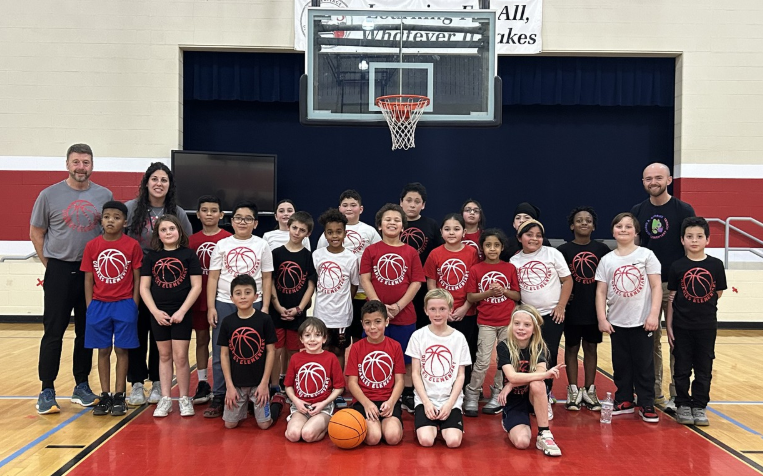
Thank you to Coach Grove, Coach O'Barto, and Coach Smith for all your hard work coaching our Chameleons Basketball Team!
Jose in Mrs. O'Barto's class offered his snack to a student who was upset. Thank you for showing kindness, Jose!
We really appreciate the wonderful thank you letters from our grade 4 students who attended The Wild Robot movie at the Alamo! Thank you, from Mrs. Hovatter and Mrs. DiMarco!
Mrs. Navarro's class does an amazing job comforting and helping a friend who struggles to communicate! They all take turns being helpers during recess, transitions and classroom activities! Way to go!!

-Mrs. Hawkins
Wyatt helped clean up another student's lunch tray at the end of lunch without being asked! Way to go, Wyatt!!

-Mrs. Hawkins
A BIG THANK YOU to the Specials Team and Mrs. Hovatter for helping out in the classrooms while Mrs. Estep and Mrs. Highstreet were assessing.
What an amazing Literacy Night on 9/25/24!!! Our teachers, our staff, our students, our ELL team, our liaison, Ms. Margarita, our community partners with JHHS Interact Club, and El Primo Taco's were amazing! We learned about VALLSS and the Literacy Act while honoring Hispanic Heritage Month!
Alivia helped me up when I fell.
I nominate Erin and Avery from Mrs. Greenwood's class because they are kind and caring to the people around them.
I nominate Kynlee, because she includes me.
Jayana was nice, because she gave Amara her milk when Amara almost choked on her food.
I nominate Elijah from Ms. Greenwood’s class. He got a chair for someone who didn’t speak English.
Congratulations to Mrs. Hovatter for her podcast debut, spreading the word of RECESS=SUCCESS!
Avery in Mrs. Duvall's class gave a friend a turn on the monkey bars.
We have seen students inviting other students to play and being kind at recess! These students have been older and younger Chameleons! Well done!!!
Willow from Ms. Hott-McCoy's class helped a friend along the monkey bars at recess. He was so happy! He yelled, "I'm doing it!"
I nominate Mrs. Cootware for understanding me when I am upset. Thank you! (Anonymous student)
Gabriel in Mrs. Duvall's class invited Damien to play with him at recess.
Emily and Pierce in Mrs. Duvall's class helped Ezra when he was feeling sad.
Genesis in Mrs. Duvall's class gave Brandon a turn on the swing.
Lucca in Mr. Bowman's class helped a friend when they were sad.
Tripp, in Mrs. J. Berry's class, helped a friend at recess by pushing him gently on the swing!
Alex Ross was a great helper when a peer came into the classroom with their shoe untied. He immediately stopped what he was doing to tie the other child's shoe! What a great way to be KIND to others!

-Mrs. Hawkins
Gracias Margarita Castillo por su gran papel en el apoyo a los estudiantes y las familias!

Thank you Margarita Castillo for your great role in supporting students and families!
Ms. KT is the coolest! She helps me in school.
GQES Chameleons are doing a great job of learning routines!
GQES Chameleons are learning to BE KIND with:
Smiling Faces, Listening Ears, Helpful Hands, Respecting Boundaries and Doing Their Best in All LEARNING Tasks!!!!
GQES Chameleons Got HOPE!!!!
GQES is the best!
We are so excited to have our Quarles Chameleons back at school!
A HUGE 'Thank You' to Ms. Hovatter and staff for bringing the YOU UPLIFT Kindness Wall to Garland R. Quarles Elementary!
Go Chameleons!

If you would like to renew your YouUplift Kindness eWall subscription, then please click on one of the following:

If you feel you are receiving this message in error, then please contact us at:
doug@YouUplift.com
276-733-9204
Yes! There are no Sign-Ups and no Log-Ins required in order to participate, as we collect no data or information of any kind. The platform is currently being used by large and small school systems throughout the country in almost all 50 states, and it has passed 100% of all school privacy regulations to date.
Yes! You can have all messages sent to as many faculty email inboxes as you’d like for Approval, and we can change or add to this list at any time.
Yes! Many of our schools do this, because if your students take to it – then the messages can begin to overflow your school email inbox at times. Not only will a separate gmail account prevent this from happening, but you can also make it accessible to all faculty members if you choose to.
You can choose one of three ways to display your messages onto a facility TV monitor.
  1. HDMI CORD – Some schools will access their Kindness eWall on a laptop and run an HDMI cord to their TV monitor.
  2. CAST – Some schools will access their Kindness eWall via a tablet or device and will cast it to their TV monitor via a Chromecast or Apple TV device.
  3. SMART TV WITH INTERNET BROWSER – If your Smart TV has an Internet Browser (Samsungs), then you can place your Kindness eWall link in the browser and it will run from there.
Yes! You can edit the text of any message before Approving it. In addition, if you’d like to keep a message but would like to remove an included image… or if you’d like to keep an image and remove the text, then you can do this before Approving the message. Your Rotating Display will only display exactly what you choose to make visible.
You will have a back office ADMIN PANEL that will allow you to delete, edit, and approve messages (individually or in bulk).
You will have a back office ADMIN PANEL that will allow you to customize your colors, logo, title, and font size.
Upon your request, we can replace your current Anonymous Submission Form with a Form from your school’s email system (ex. Google Form). This makes messages come to you with the author’s email address included, and you simply COPY/PASTE the message onto your INSTANT POST Page in order to make it live.

(Note: Because messages are submitted through your school’s email system, the Character eWall collects no data or information – making it fall within all school privacy regulations.)
We can provide your Tech Team with a simple line of code that will allow them to embed your Rotating Display of Approved Messages onto your school website, so that they are visibly scrolling whenever anyone comes to your site.
The system is set to display the 100 most recently Approved messages, as older messages start falling out of the rotation in order to make room for the newer messages. However, we can increase or decrease this number to be whatever you’d like it to be.
Your subscription includes an unlimited number of messages and an unlimited number of displays for everyone in your school for the entire length of your subscription.
Yes and No. Your Character Wall is a web app, but it is not located in an App store. However, this link shows you how you can easily turn your Kindness Wall into an app for any android or apple device: Phone Web App Instructions
Phone App Install Feature
Currently, YouUplift does not have an app located in the App Store. However, the following link provides simple instructions on how to easily turn your Kindness eWall into a homepage app for any mobile device: Phone App Install Instructions
(Great tech assignment for students!)
Website Embed Feature
This feature provides your Tech Team with a simple line of code that would allow you to embed your Rotating Display of Positive Messages into your school website, so that visitors can instantly see your messages.
Social Media Share Feature
This feature places Social Media Share Buttons on your entire Kindness e-Wall webpage or just on your Rotating Display only – whichever you prefer.

Yes! There are no Sign-Ups and no Log-Ins required in order to participate, as we collect no data or information of any kind. The platform is currently being used by large and small school systems throughout the country in almost all 50 states, and it has passed 100% of all school privacy regulations to date.

Yes! You can have all messages sent to as many faculty email inboxes as you’d like for Approval, and we can change or add to this list at any time.

Yes! Many of our schools do this, because if your students take to it – then the messages can begin to overflow your school email inbox at times. Not only will a separate gmail account prevent this from happening, but you can also make it accessible to all faculty members if you choose to.

You can choose one of three ways to display your messages onto a facility TV monitor.
  1. HDMI CORD – Some schools will access their Kindness eWall on a laptop and run an HDMI cord to their TV monitor.
  2. CAST – Some schools will access their Kindness eWall via a tablet or device and will cast it to their TV monitor via a Chromecast or Apple TV device.
  3. SMART TV WITH INTERNET BROWSER – If your Smart TV has an Internet Browser, then you can place your Kindness eWall link in the browser and it will run from there.

Yes! You can edit the text of any message before Approving it. In addition, if you’d like to keep a message but would like to remove an included image… or if you’d like to keep an image and remove the text, then you can do this before Approving the message. Your Rotating Display will only display exactly what you choose to make visible.

You will have a back office ADMIN PANEL that will allow you to delete, edit, and approve messages (individually or in bulk).

You will have a back office ADMIN PANEL that will allow you to customize your colors, logo, title, and font size.

In it’s default setting, your school’s Kindness eWall uses an Anonymous Submission Form in order to comply with all school privacy regulations. Therefore, though you will be able to APPROVE all submitted content before it becomes visible, you will not know who the author of the message is.


HOWEVER, upon your request, we can include a SUBMISSION FORM LOGIN which would require users to enter their email / password in order to submit a message. This would allow you to APPROVE all submitted content before it becomes visible and will also provide you with the email address of each message’s author (whether you Approve it or not).

We can provide your Tech Team with a simple line of code that will allow them to embed your Rotating Display of Approved Messages onto your school website, so that they are visibly scrolling whenever anyone comes to your site.

The system is set to display the 100 most recently Approved messages, as older messages start falling out of the rotation in order to make room for the newer messages. However, we can increase or decrease this number to be whatever you’d like it to be.

Your subscription includes an unlimited number of messages and an unlimited number of displays for everyone in your school for the entire length of your subscription.

Yes and No. Your Kindness Wall is a web app, but it is not located in an App store. However, this link shows you how you can easily turn your Kindness Wall into an app for any android or apple device: Phone Web App Instructions